

Expect anywhere from roughly 30 minutes to several hours of recording, depending on the camera type and settings you run. High resolution, stabilization, and GPS all shrink that number fast. If full-ride coverage matters, whether that’s a two-hour commute loop or a bikepacking leg, your best move is a camera with a long camera-only runtime or a USB-C power bank setup. The sections below break down why claimed numbers rarely match your ride, and how to close that gap.
TL;DR:
- Most bike cameras’ actual runtime in real-world conditions is about half of the claimed lab figures, especially when using high resolution, stabilization, or GPS.
- Using a USB-C power bank for pass-through charging roughly doubles recording duration, making it essential for longer rides on ultracycling or bikepacking trips.
- Cold weather significantly reduces battery capacity, so riders should store spares in insulated pockets and avoid charging depleted batteries in near-freezing temperatures.
- For rides longer than three hours, prioritizing a long camera-only mode or a swappable battery system provides better coverage than higher resolution features.
- Budgeting for accessories like mounts and larger power banks is crucial, as they often impact real-world recording time more than camera price or specs.
Table of Contents
- Bike Camera Battery Life: Claimed Runtime vs. Real-World Results
- Typical Runtimes by Camera Type: Helmet Cams, Action Cams, and Dashcams
- Practical Tactics to Extend Your Bike Camera’s Battery Life
- Choosing a Camera Based on Your Ride Profile
- Publisher Perspective: Battery Reliability From The Beam’s Experience
- What Riders Get Wrong About Battery Life
- Never Run Out of Recording With the Right Setup
- Sources
- FAQ
Bike Camera Battery Life: Claimed Runtime vs. Real-World Results
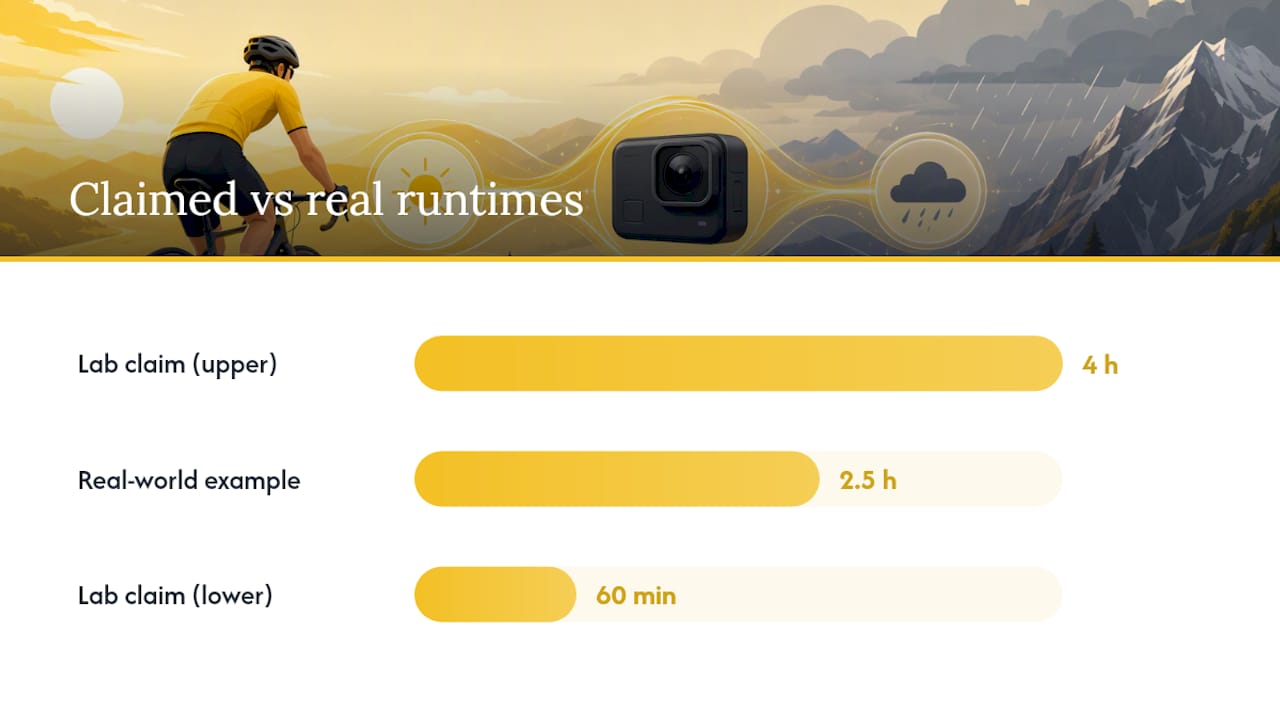
Manufacturer specs get measured under conditions almost nobody rides in. Labs typically test at 25°C with the screen off, Wi-Fi disabled, and often at a lower resolution than most riders would actually choose. That’s why a camera claiming four hours of recording might realistically give you two and a half once you turn on your preferred settings and head outside.
A handful of features do most of the damage to real-world runtime:
- High resolution and frame rate: 4K at 60fps draws far more power than 1080p at 30fps.
- Active stabilization: constant image processing is one of the biggest hidden battery drains.
- GPS logging: useful for route data, but it keeps a power-hungry radio running the entire ride.
- Wi-Fi and smartphone pairing: convenient for instant playback, but it burns battery even when idle.
- Always-on screens: a live preview display pulls noticeably more current than a screen that sleeps after a few seconds.
Buyer guides commonly list claimed runtimes between about 60 and 240 minutes depending on mode, and warn that stacking high-res recording with stabilization and wireless features drags real-world numbers well below the manufacturer’s lab figures. Cold weather compounds the problem. Battery chemistry slows down as temperature drops, and some manufacturers publish separate runtime figures for near-freezing conditions that fall well short of their 25°C benchmark, according to group testing on cycling cameras.
One more detail catches riders off guard: loop recording. Most cameras overwrite the oldest footage once the SD card fills, which protects you from running out of storage but means a dead battery mid-ride, not a full card, is usually what ends your recording early.
Typical Runtimes by Camera Type: Helmet Cams, Action Cams, and Dashcams
Battery capacity varies a lot by camera category, and matching that capacity to how you actually ride matters more than chasing the highest spec sheet number.
- Helmet-mounted cameras tend to be compact and light, which usually means a smaller internal battery. Expect somewhere in the one-to-two-hour range at higher resolutions, sometimes stretching past that if you drop to lower settings.
- Compact action cameras show the widest spread of any category. Push 4K at high frame rates and you might get under an hour. Switch to a camera-only mode at 1080p with stabilization and GPS off, and some models stretch past three or four hours.
- Dedicated bike dashcams are often engineered specifically for continuous recording rather than short highlight clips, which tends to translate into longer camera-only runtimes and makes them a practical pick for daily commuting.
Put those numbers against real rides and the pattern gets clearer. A 45-minute commute rarely stresses any of these cameras. A three-hour weekend training ride starts to separate the cameras that can go the distance from the ones that can’t. A multi-hour bikepacking leg, six, eight, ten hours in the saddle, pushes past what almost any single internal battery can cover on its own, which is exactly where charging strategy starts to matter more than the battery spec itself.
Group tests and editorial reviews consistently flag battery reliability as a top concern for safety-focused riders, and note that cameras offering dedicated camera-only modes or larger batteries tend to deliver more usable real-world recording duration than flashier, feature-loaded alternatives, per Cyclingnews’s action camera testing.
Practical Tactics to Extend Your Bike Camera’s Battery Life
You don’t need a new camera to record longer. You need a strategy. Here’s what actually works, in rough order of reliability:
- Carry a swappable battery. If your camera supports it, a spare battery in a jersey pocket or top tube bag turns a two-hour limit into effectively unlimited coverage, as long as you’re willing to stop and swap.
- Use USB-C pass-through charging with a power bank. This is the method experienced bikepackers rely on most, because it removes the interruption risk entirely, according to power bank testing for bikepacking. A simple rule of thumb: size your power bank to roughly double your camera’s battery capacity in mAh at the same voltage to reliably double your recording time.
- Drop resolution and disable extras you don’t need. Stepping down from 4K to 1080p, turning off GPS logging, and disabling always-on stabilization can meaningfully extend runtime, though you trade some video detail and mapping data for it.
- Route the power bank cable smart. Tuck it along the top tube or in a frame bag rather than letting it dangle near your front wheel or handlebar controls.
Pro Tip: Test your power bank and pass-through setup on a short ride before you commit to it on a long one, some camera and power bank combinations don’t play well together, and you want to find that out at home, not 40 miles from the car.
Choosing a Camera Based on Your Ride Profile
Start with one number: your longest realistic ride time, multiplied by 1.2 as a buffer. That figure tells you what runtime you’re actually shopping for, not the marketing claim on the box.
From there, match your riding style to the right battery approach:
- Daily commuters rarely need more than 60 to 90 minutes of runtime, so almost any camera with a reasonable internal battery will do.
- Weekend and endurance riders covering three-plus hours should prioritize either a long camera-only mode or a swappable battery system.
- Bikepackers and ultracyclists logging six or more hours a day need USB-C pass-through charging as a baseline requirement, not a nice-to-have.
Before buying, check the spec sheet for three things: the conditions the claimed runtime was measured under, whether the camera has a stated temperature rating, and whether it can charge while recording without interruption.
| Rider type | Typical ride length | Best battery approach |
|---|---|---|
| Commuter | Around 1 to 2 hours | Standard internal battery |
| Weekend/endurance rider | 3 to 4 hours | Swappable battery or long camera-only mode |
| Bikepacker/ultracyclist | 6 hours or more | USB-C pass-through with power bank |
Budget for the accessories alongside the camera itself. A mount that positions the power bank cable safely, a spare battery, or a properly sized power bank often matters more to your actual recording outcome than the camera’s sticker price.
Publisher Perspective: Battery Reliability From The Beam’s Experience
We design ride-focused hardware with reliability as the first priority, not resolution. That shows up in how we think about charging: mounting position, cable routing, and consistent performance across the temperature swings a real riding season throws at you.
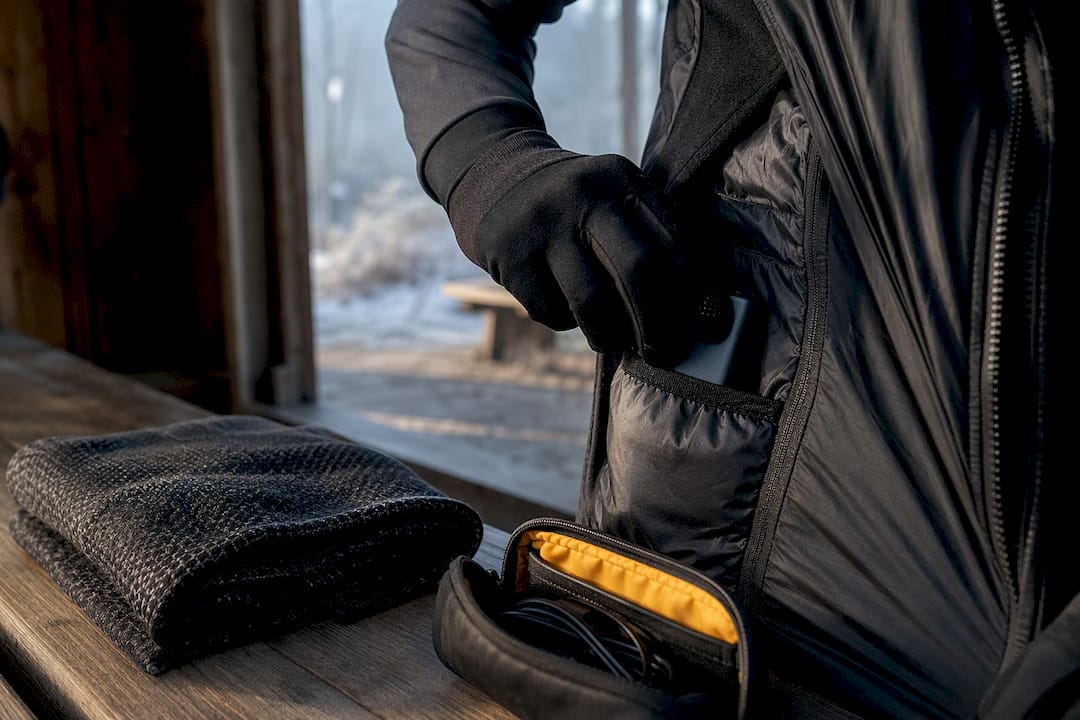
Cold weather deserves special attention. Battery chemistry loses usable capacity below freezing, and charging a depleted battery in near-zero conditions can shorten its long-term lifespan. We cover this in detail in our guide on why you shouldn’t charge bike batteries below 0°C, including how to store spares in an insulated pocket and rotate them quickly to limit cold exposure.
When building ride-focused devices, camera-only runtime, dependable charging options, and secure mounting take priority over chasing spec-sheet resolution numbers that rarely survive contact with a real ride.
What Riders Get Wrong About Battery Life
Most advice on this topic obsesses over the wrong number. Riders compare claimed runtimes on spec sheets as if they were apples to apples, when the testing conditions behind those numbers rarely resemble an actual ride. A camera claiming three hours and one claiming two hours might perform identically once you both run 1080p with stabilization on in 40-degree weather.
The real decision isn’t “which camera has the biggest battery.” It’s “does my charging strategy match my longest ride.” A rider doing 45-minute commutes gains nothing from obsessing over a camera rated for five hours. A rider doing eight-hour gravel days gains nothing from a camera rated for five hours either, because no single internal battery covers that ride regardless of the number on the box.
Prioritize a USB-C pass-through setup or a swappable battery system before you prioritize resolution. Coverage that actually exists beats sharper footage of a ride that only got half-recorded.
— Sophie
Never Run Out of Recording With the Right Setup
A camera like the LIVE-VIEW DASHCAM is built for continuous, camera-focused recording rather than short highlight clips, so it holds up on commutes and longer rides alike without forcing you to choose between resolution and coverage.

Pair it with the right accessories and you close the runtime gap for good. Browse our accessory collection for mounts and power solutions, check out CORKY for additional safety add-ons, or explore the full product lineup to build a setup that matches your longest ride, not just your commute. Head to the site now to find the combination that fits how far you actually go.
Sources
This article draws on editorial group tests and buyer guides, including Cyclist’s cycling camera guide for lab-versus-real-world runtime data, Cyclingnews’s action camera testing for reliability rankings, Cycloscope’s power bank testing for charging strategy, and Cycling Weekly’s group tests for swappable battery performance.
- Best cycling cameras 2026: GoPro, Insta360 and alternatives | Cyclist
- Best action cameras for cycling — Cyclingnews
- Best power banks for bikepacking | Cycloscope
FAQ
How Long Should a Bike Camera Battery Last?
Most bike cameras claim 60 to 240 minutes of recording under lab conditions, but real-world runtime with high resolution and features like GPS active is often shorter, according to Cyclist’s buyer guide testing. Dedicated bike dashcams and camera-only modes typically last longer than feature-heavy action camera settings.
How Fast Does a Bike Camera Drain Its Battery?
Resolution, stabilization, GPS, and Wi-Fi connectivity are the biggest drains, and running all of them together can cut runtime dramatically compared to a stripped-down setting. Cold temperatures accelerate the drain further, since battery chemistry loses capacity as it gets colder, per Cycling UK’s group test findings.
How Long Will My Bike Camera Battery Last on a Long Ride?
It depends entirely on your settings and your charging strategy. Without a power bank or spare battery, most cameras won’t cover rides beyond two to four hours at typical settings; with USB-C pass-through charging, recording can extend for as long as your power bank holds out, based on bikepacking power bank guidance.
What’s the Best Way to Guarantee Full-Ride Recording?
Use a camera with a genuine camera-only mode and pair it with either a swappable battery or a USB-C power bank sized to roughly double your camera’s battery capacity. Thebeamofficial’s LIVE-VIEW DASHCAM is built around this camera-focused approach for exactly that reason.
Does Cold Weather Really Affect Bike Camera Battery Life?
Yes, cold temperatures noticeably reduce usable battery capacity, and some manufacturers publish separate, lower runtime figures for near-freezing conditions. Storing spare batteries in an insulated pocket and avoiding charging depleted batteries in sub-zero conditions helps preserve both runtime and long-term battery health, as detailed in Thebeamofficial’s cold-weather battery guide.


